
Blog
The latest news are listed first.

November 10, 2026:
Apple releases new software via macOS Software Update:
- Apple XProtect Configuration Data version 5372 for OS X 10.11 to macOS 10.14 (Update Product ID: 142-53983)
- Apple XProtect Configuration Data version 5372 for macOS Catalina and later (Update Product ID: 142-53984)
XProtect is part of the built-in antivirus software of macOS. The package does not appear in the Software Update section of System Preferences (or App Store in older versions of the operating system). macOS is updating the software automatically in the background if you have granted the system permission to download system data files and security-related files.
November 9, 2026:
Apple releases new software via macOS Software Update:
- macOS 27.2.1 Golden Gate
- macOS 27.2.1 Golden Gate Update (Update Product ID: 142-52990)
- macOS 27.2.1 Golden Gate Update (Update Product ID: 142-52625)
- macOS 27.2.1 Golden Gate Update (Update Product ID: 142-54833)
- BridgeOS Customer Update 26.7.3 (Update Product ID: 142-54129)
- macOS 26.7.3 Tahoe (Update Product ID: 142-54128)
- macOS 15.8.3 Sequoia (Update Product ID: 142-54123)
The updates fix critical security issues. There are temporarily three different distribution lines of macOS 27.2.1, separating Macintosh models released in November 2026.
November 5, 2026:
Apple releases new software via macOS Software Update:
- macOS 27.2 Golden Gate Update (Update Product ID: 142-52618)
- macOS 27.2 Golden Gate Update (Update Product ID: 142-16607)
- Apple Mobile Device Update (Update Product ID: 142-44118)
These are new variants of already released software, adapted to devices about to be released in November 2026.
November 4, 2026:
Apple releases new software via macOS Software Update:
- SF Symbols 27.0 (Update Product ID: 142-29076)
SF Symbols is a library of over 7,000 symbols designed to integrate seamlessly with San Francisco, the system font for Apple platforms. Symbols come in nine weights and three scales, automatically align with text, and can be exported and edited using vector graphics tools to create custom symbols with shared design characteristics and accessibility features. Symbols feature multi-layer drawings designed for motion, enabling a range of expressive animations. Crafted for a global audience, symbols automatically adapt to a user’s reading direction and feature localized designs for over 20 international scripts.
SF Symbols 27 features enhanced search capabilities, new symbols and design updates to existing symbols that integrate with Apple’s universal design language. These new symbols are available in apps macOS 27.
November 3, 2026:
Apple releases new software via macOS Software Update:
- Apple XProtect Configuration Data version 5371 for OS X 10.11 to macOS 10.14 (Update Product ID: 142-52400)
- Apple XProtect Configuration Data version 5371 for macOS Catalina and later (Update Product ID: 142-52401)
XProtect is part of the built-in antivirus software of macOS. The package does not appear in the Software Update section of System Preferences (or App Store in older versions of the operating system). macOS is updating the software automatically in the background if you have granted the system permission to download system data files and security-related files.

November 2, 2026:
We are releasing TinkerTool
version 11.72:
- This version adds support for macOS 27.2 Golden Gate.
TinkerTool is an application that gives you access to additional preference settings Apple has built into macOS. This allows to activate hidden features in the operating system and in some of the applications delivered with the system.
October 30, 2026:
Apple releases new software via macOS Software Update:
- Command Line Tools for Xcode 27.2 (Update Product ID: 142-50405)
The Command Line Tools enable UNIX-style development via Terminal by installing command line developer tools, as well as macOS SDK frameworks and headers. Many tools are included, such as the Apple LLVM compiler, linker, and Make. If you use Xcode, these tools are also embedded within the Xcode IDE.

October 29, 2026:
We are releasing TinkerTool
System 10 version 10.1:
- Added new feature to install Rosetta manually. It is located on the System pane.
- Added new feature to show the storage space currently in use by the variable components of macOS, like AI models. It is located on the Info pane.
- Added new option to the physical disk copy feature: It is now possible to write a raw disk image directly to a block-storage device. This way, TinkerTool System can be used to create installation media for single-board computers, for example.
- Added new section to the pop-up menus to inspect classic logs about delete operations on the Spotlight index to remove information about encrypted file contents.
- Added new button to the log file viewer which allows redirection to an external property list viewer (like our PropEdit application, for example) when such content is detected within a log file.
- Added a workaround for issues when remembering the preferred widths of table columns was not working as expected in the main control window of the application.
- There is now additional guidance when using the special launch feature on applications that don’t have a full user interface.
- Fixed a very small memory leak that could occur when the application was accessing hardware features.
TinkerTool System 10 is a collection of system utility features helping you in performing advanced administration tasks on Apple Macintosh computers running macOS 27 Golden Gate.

October 29, 2026:
We are releasing TinkerTool System
9 version 9.95:
- Added a workaround for issues when remembering the preferred widths of table columns was not working as expected in the main control window of the application.
- Fixed a very small memory leak that could occur when the application was accessing hardware features.
TinkerTool System 9 is a collection of system utility features helping you in performing advanced administration tasks on Apple Macintosh computers running macOS 15 Sequoia or macOS 26 Tahoe.
October 26, 2026:
Apple releases new software via macOS Software Update:
- macOS 27.2 Golden Gate
- macOS 27.2 Golden Gate Update (Update Product ID: 142-50055)
- BridgeOS Customer Update 27.2 (Update Product ID: 142-50017)
- macOS 26.7.2 Tahoe (Update Product ID: 142-50020)
- macOS 15.8.2 Sequoia (Update Product ID: 142-50013)
- Safari 27.2 for macOS Tahoe (Update Product ID: 142-16640)
- Safari 27.2 for macOS Sequoia (Update Product ID: 142-16627)
The updates fix a high number of critical security issues. With macOS 27.2, Siri AI is now supporting French, Japanese, Korean, Portuguese, and Spanish. The design of Apple Music was changed from red and black to white and black.

October 26, 2026:
We are releasing Sync
Checker version 4.7:
- Added new ignore filter for hidden Time Machine files helpful when checking the correct operation of backups.
- Some document icons have been slightly revised to support the style of macOS 27.
- Fixed a problem where the Select buttons to choose the objects for a sync-check might have opened file navigation dialogs where most objects have been disabled.
- Fixed a problem where checking files of a Time Machine backup could result in an error message indicating an exception marked by the indicator “isTimeMachineACEIn”.
- Fixed a layout problem with the legend of abbreviations for text reports. This only affected the German language version.
Sync Checker is a diagnostic application which can check if two folders or volumes are perfectly synchronized, i.e. if they have exactly the same contents. When creating backup copies of valuable files, or when making sure that two computers or mobile devices work on the same set of data, the status of being “in perfect sync” can be very important. In order to be safe and to prevent loss of data, you can let Sync Checker verify whether a pair of file collections is matching exactly or not.
October 23, 2026:
Apple releases new software via macOS Software Update:
- Apple Mobile Device Update (Update Product ID: 142-25884)
The update provides new icons and system resources for new Apple hardware to be released in October 2026.

October 22, 2026:
The service for submitting technical data for
unsupported Macintosh systems via System Monitor Plus
has been fully restored. All our web services are in
normal operation again.
Der Dienst zum Einsenden technischer Daten zu nicht unterstützen Macintosh-Systemen über Systemmonitor Plus ist vollständig wiederhergestellt. Alle unsere Web-Dienste befinden sich wieder im Normalbetrieb.
October 21, 2026:
Apple releases new software via macOS Software Update:
- Apple XProtect Configuration Data version 5368 for OS X 10.11 to macOS 10.14 (Update Product ID: 142-44023)
- Apple XProtect Configuration Data version 5368 for macOS Catalina and later (Update Product ID: 142-44024)
- Apple XProtect Payloads version 170 (Update Product ID: 142-44702)
XProtect is part of the built-in antivirus software of macOS. The package does not appear in the Software Update section of System Preferences (or App Store in older versions of the operating system). macOS is updating the software automatically in the background if you have granted the system permission to download system data files and security-related files.
October 21, 2026:
Submitting technical data for unsupported Macintosh
systems via System Monitor Plus is not possible at the
moment. Other operations are not affected.
Due to very critical, worldwide security issues regarding the use of PHP web server technology, the necessary service for System Monitor Plus is currently shut down intentionally. You will receive the message shown below instead. For more detailed technical background information, please see CVE-2026-109618 and CVE-2026-109619. We will keep you informed on this page when the issue has been resolved. Thanks for your understanding.
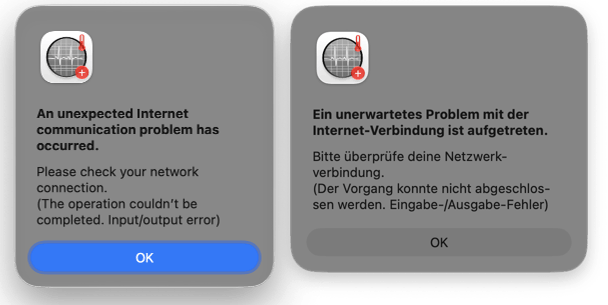
Das Einsenden technischer Daten zu nicht unterstützen Macintosh-Systemen über Systemmonitor Plus ist zurzeit nicht möglich. Andere Vorgänge sind nicht betroffen.
Aufgrund von sehr kritischen, weltweiten Sicherheitsproblemen bezüglich der Nutzung von PHP-Web-Server-Technik ist der notwendige Dienst für Systemmonitor Plus im Moment absichtlich abgeschaltet. Stattdessen erhalten Sie eine Fehlermeldung ähnlich wie oben abgebildet. Für detailliertere technische Hintergrundinformationen schauen Sie bitte unter CVE-2026-109618 und CVE-2026-109619. Wir werden Sie auf dieser Seite informieren, wenn das Problem behoben wurde. Danke für Ihr Verständnis.
October 13, 2026:
Apple releases new software via macOS Software Update:
- Apple XProtect Configuration Data version 5367 for OS X 10.11 to macOS 10.14 (Update Product ID: 142-42487)
- Apple XProtect Configuration Data version 5367 for macOS Catalina and later (Update Product ID: 142-42486)
XProtect is part of the built-in antivirus software of macOS. The package does not appear in the Software Update section of System Preferences (or App Store in older versions of the operating system). macOS is updating the software automatically in the background if you have granted the system permission to download system data files and security-related files.
October 12, 2026:
We are releasing System Monitor
Plus version 3.1:
- Added full support for Mac Studio (M5 Ultra).
- Confirmed official support for Mac mini (M5 Pro).
- Confirmed official support for Mac Studio (M5 Max).
System Monitor Plus is a free add-on for System Monitor. After simply copying it to your computer, many additional features become available which are not permitted to be directly included in Apps from the Mac App Store.

October 8, 2026:
We are releasing Mac Power
Monitor version 3.0:
- This version adds support for Macs with M6 processors.
Mac Power Monitor is a graphical, easy-to-use interface for the energy and power measuring features of macOS.
October 8, 2026:
We are releasing System Monitor
Plus version 3.0:
- Added full support for Mac mini (M6).
System Monitor Plus is a free add-on for System Monitor. After simply copying it to your computer, many additional features become available which are not permitted to be directly included in Apps from the Mac App Store.
October 6, 2026:
Apple releases new software via macOS Software Update:
- Apple XProtect Configuration Data version 5366 for OS X 10.11 to macOS 10.14 (Update Product ID: 142-30520)
- Apple XProtect Configuration Data version 5366 for macOS Catalina and later (Update Product ID: 142-30521)
XProtect is part of the built-in antivirus software of macOS. The package does not appear in the Software Update section of System Preferences (or App Store in older versions of the operating system). macOS is updating the software automatically in the background if you have granted the system permission to download system data files and security-related files.
October 1, 2026:
We are releasing TinkerTool
System 10 version 10.01:
- As Apple has now released the official reference manuals for macOS 27, the corresponding links in the Quick Help feature could now be updated accordingly.
- Added preparations for expected changes in upcoming versions of the operating system.
- This version can now be launched on preview versions of the operating system.
- Fixed an issue where no navigation sheet would appear when trying to submit an old registration file from MyCommerce Digital River when performing an upgrade activation on an empty computer.
- The feature to clear the software update catalog had to be removed, because it is no longer supported by Apple.
TinkerTool System 10 is a collection of system utility features helping you in performing advanced administration tasks on Apple Macintosh computers running macOS 27 Golden Gate.
October 1, 2026:
We are releasing TinkerTool System
9 version 9.94:
- Fixes a problem where the corresponding error message might not have been shown when a search for file paths exceeding the maximum permitted length was performed in deeply nested folders, while a technical issue occurred which aborted the operation. The user interface of this feature was also slightly redesigned.
- The feature to clear the software update catalog had to be removed, because it is no longer supported by Apple.
- Several details in the reference manual have been modified to reflect changes in recent operating system updates.
TinkerTool System 9 is a collection of system utility features helping you in performing advanced administration tasks on Apple Macintosh computers running macOS 15 Sequoia or macOS 26 Tahoe.